FreezeTag: An Open-Source, Self-Hosted Image Management App
I've been frustrated with photo apps for a while. All the mainstream ones, like Google Photos and Apple Photos, do a pretty decent job as far as storage is concerned. They work, and they make it easy to upload and access your photos from anywhere. The problem is that using them means your entire photo library lives on someone else's servers, and you're subject to pricing that grows as your collection does. For casual users, that might be an acceptable tradeoff for the convenience. But for people (like me) that take a lot of photos and want more control over their data, it's a pretty significant downside.
The organization problem is even worse than the storage concerns. Take a photo that could easily belong in multiple categories at once (maybe it's a photo of your dog at a beach with a sunset, or a picture of a family gathering with various people). You might think you could just add it to an album or folder, but then you're stuck choosing one category to put it in, and you've still got the same problem when you try to find it through any of the others. You try searching for it instead, but because there are so many parts to that photo, you're stuck having to scroll through thousands of photos to find that one specific moment.
Both Google Photos and Apple Photos somewhat get around this with AI-powered search, but they don't let you define your own structured labels (so if they say a picture of "sea turtles" is actually a picture of "birds", you're out of luck (true story)). A self-hosted alternative, DigiKam, does support tags, but they feel grafted on to its folder model. None of these treat user-defined organization as a primary feature.
That's the gap FreezeTag set out to fill.
What FreezeTag Is
FreezeTag is a free, open-source, self-hosted image management app built for photographers, small businesses, and anyone who wants actual control over how their photos are stored and organized. The whole system runs through Docker Compose, so standing up an instance is a single command. The interface is browser-based, so any device on the same network can connect without installing anything on the client. Your photos stay on your own hardware.
The core design decision was making tags the primary organization unit instead of folders or albums. Any image can belong to multiple logical groupings at once, which a folder hierarchy simply can't do. A photographer can label a batch of images with client:SteveJobs, location:SaltLake, and format:print at upload time, then later pull exactly that subset by querying across any combination of those tags.
FreezeTag also ships with an extensible Python plugin system for automated tagging. For now, first-party plugins include a local "Recognize Anything Model" (RAM) tagger, a face recognition plugin, a meme generator (non-negotiable), and a Google Gemini tagger for people who are okay with the cloud-assisted tradeoff in exchange for higher accuracy and detail of the tags. More will be coming soon™, and users can always write their own plugins in the meantime.
Here's a demo walkthrough we recorded at the end of the capstone:
The Team and My Role
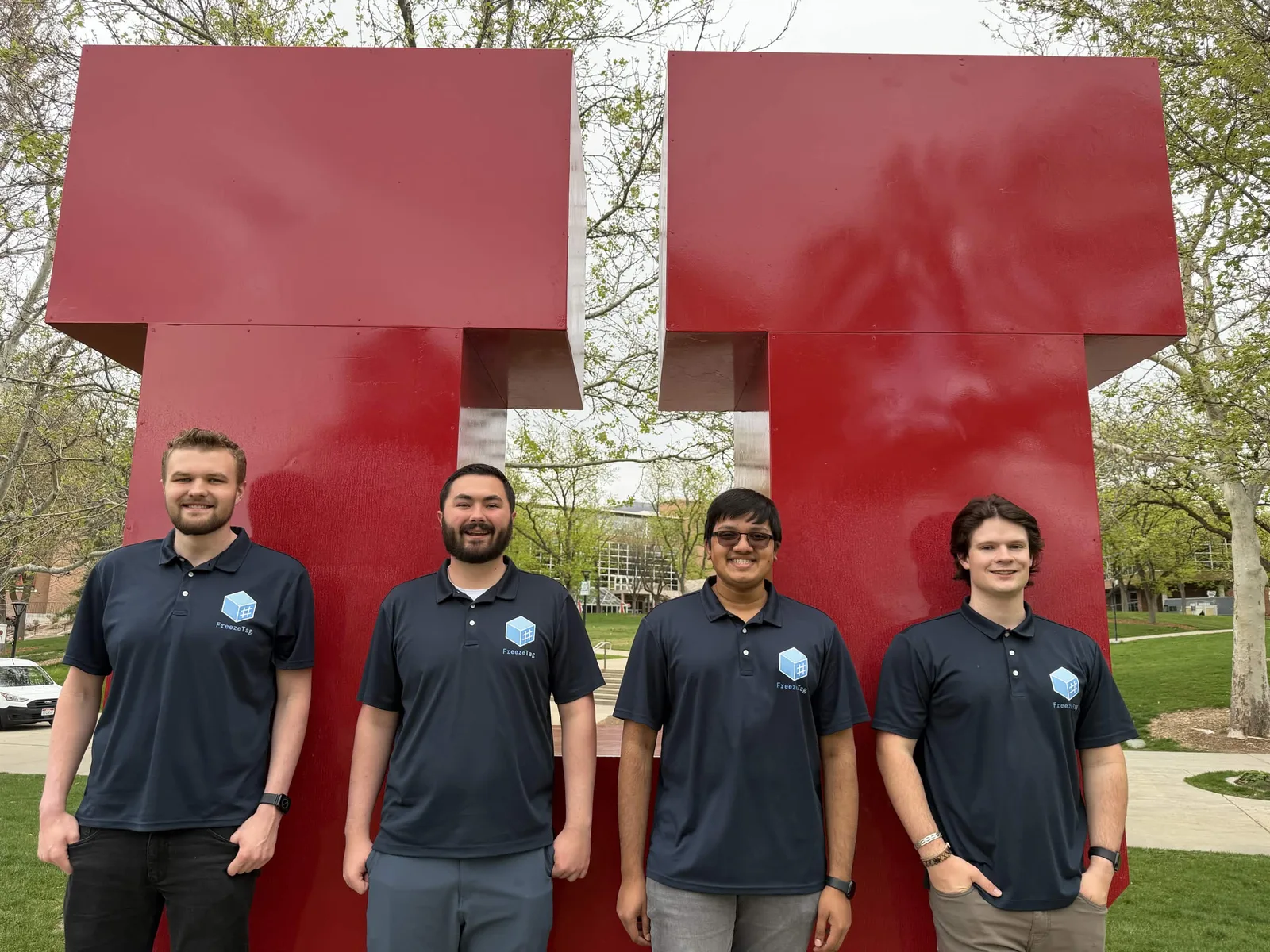
FreezeTag was my senior capstone project at the University of Utah, built with three other developers across two semesters (Fall 2025 and Spring 2026). We split into two frontend and two backend engineers, each owning a clearly defined area of the codebase from the start. My role was the frontend interface developer, which meant I was responsible for the overall visual design, UI/UX, and frontend implementation across every user-facing page, including the gallery, tag management, settings, and a custom theme creator (more on that in a bit).
The other frontend engineer, Brayden, handled the lower-level frontend concerns (API communication, authentication state, and how data flowed through the application) that my work would sit on top of. On the backend side of development, Ethan owned the API architecture and core features like albums, sharing, authentication, and permissions, while Max handled the plugin communication protocol, the async job system, ImageMagick integration, and the image database structure.
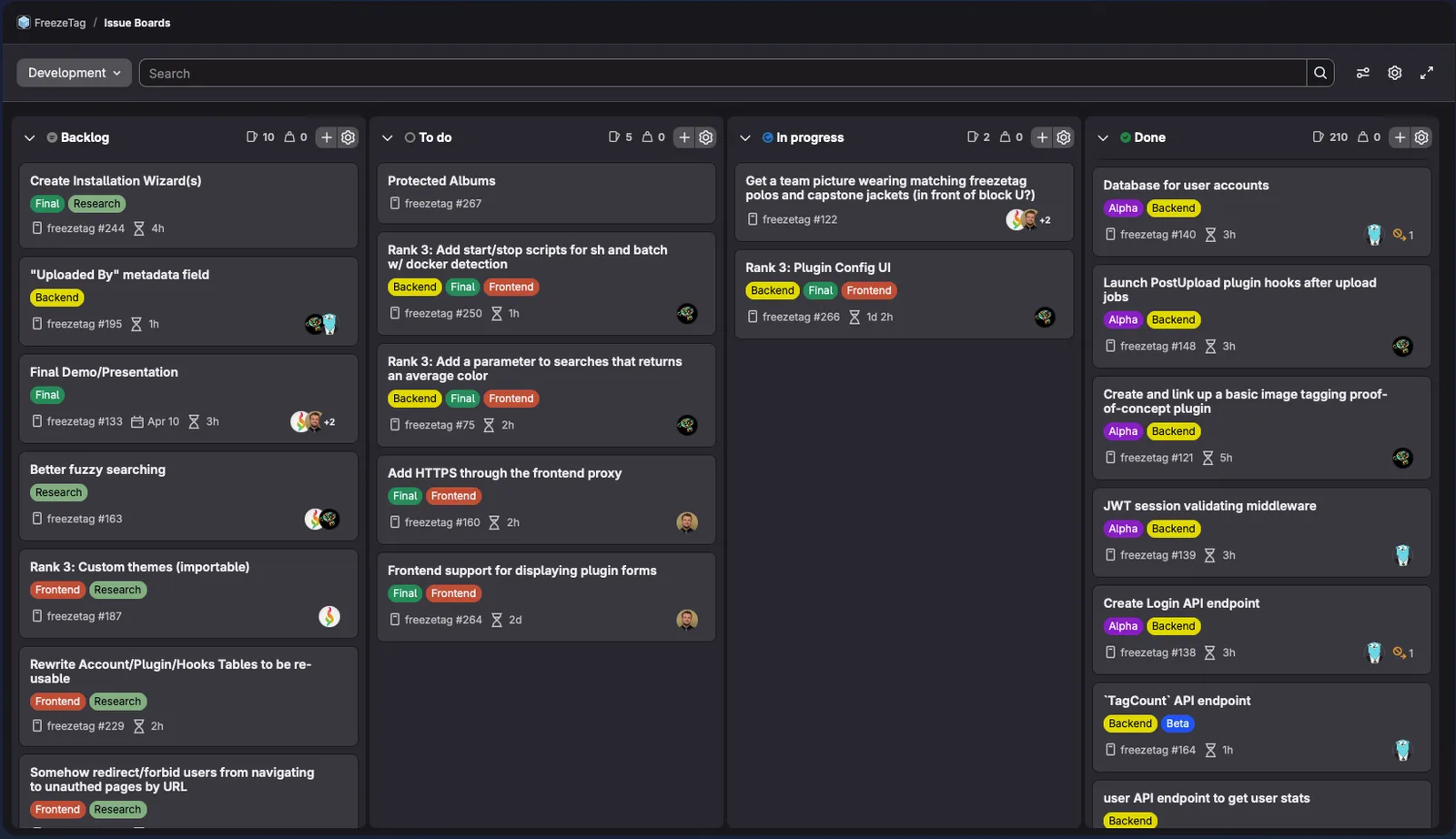
We ran the whole project as an Agile process organized around four-week sprints, tracked through a GitLab issue board with phase, domain, and state labels on every issue. We met three times a week: a Monday evening sprint planning meeting, a Wednesday standup meeting, and a Friday in-person staff review. Most day-to-day coordination was asynchronous over Discord.
What I'm Proud Of
All four of us took this seriously in a way I didn't fully expect going in. We started Fall 2025 with a clear project vision and shipped that exact vision in Spring 2026, no major cuts, no scope creep in the wrong direction. As college seniors, I expected there to be some amount of "well, we have to turn something in, let's just throw something together at the end" energy, but we were all super passionate about this project and wanted it to be a really good app, and that made a pretty big impact in how it turned out.
The development process also helped a lot with this. Every merge request had to pass automated format, lint, and test checks before a human was even able to review it. We held an 80% test coverage minimum across the frontend and backend from day one, and finished at 95% and 85% respectively. I'd be lying if I said it didn't feel like overkill at times, but it did also mean that we basically never broke each other's work.
The part that still catches me off guard a little is how FreezeTag ended up surprisingly close to feature parity with Google Photos and Apple Photos for all the things that matter. The features we have work well, and the combination of tag-based search with a user-extensible plugin system isn't something any major image management product offers. I didn't expect to be able to say that about something I built in a class.
We also presented FreezeTag at the end-of-semester Kahlert School of Computing Capstone Demo Day and were selected as Finalists by a vote from the judges (which was a good confirmation that we weren't the only ones who thought it turned out well).
A few specific pieces of the frontend I'm particularly happy with:
Tags Dropdown
The dropdown menu in the gallery filters by intersection, only showing tags that appear in the current view. Rather than naively listing every tag in the library, selecting a tag filters the gallery and immediately updates the dropdown to show only the tags that actually appear on the filtered images. As you narrow your search, the dropdown updates to reflect the current set of relevant tags, making it easy to refine searches and discover related tags without needing to know the exact library structure ahead of time. It also prevents users from getting lost in a sea of irrelevant tags (was a photo of your dog at the beach really also tagged "architecture"?).
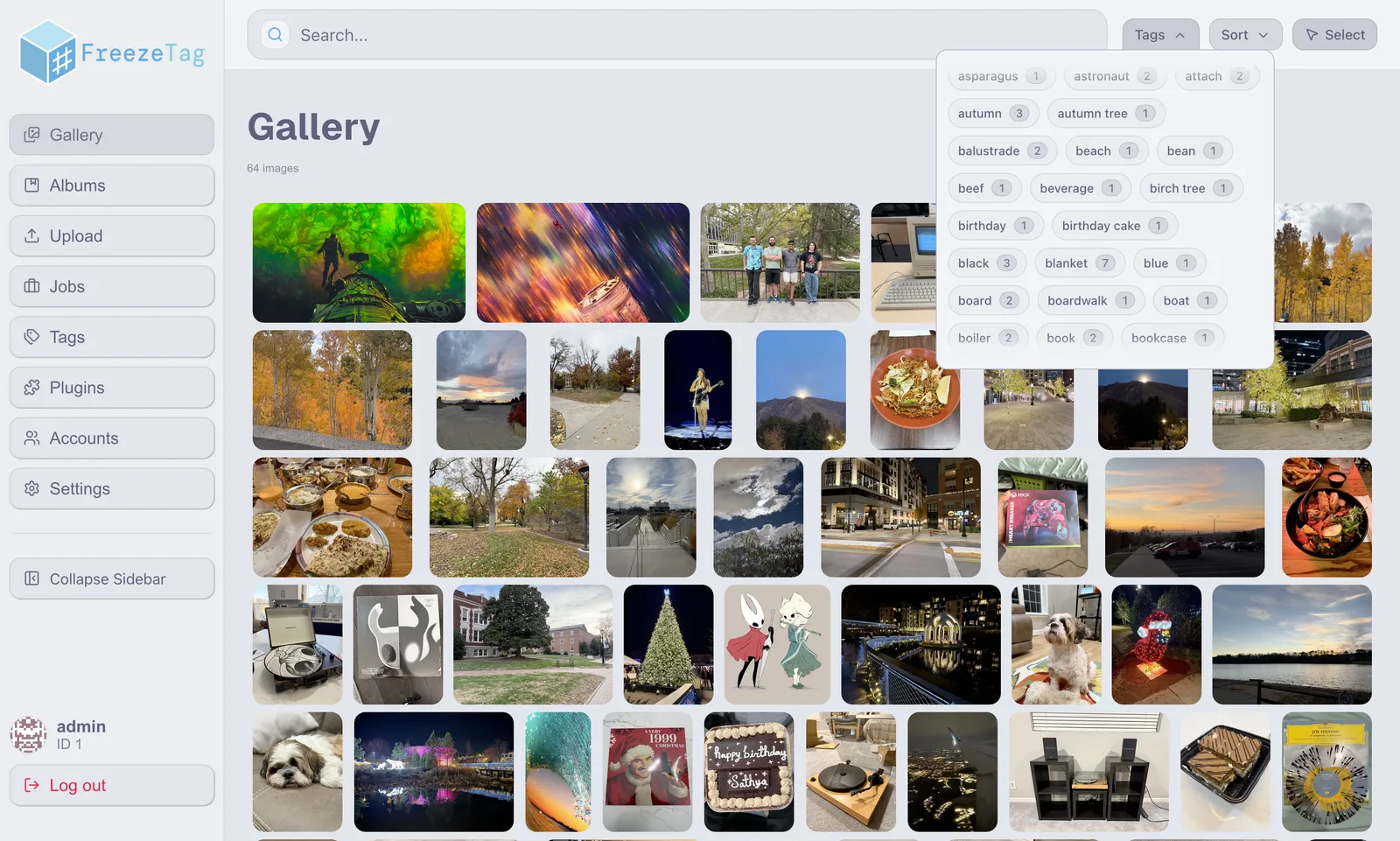
Image Previews
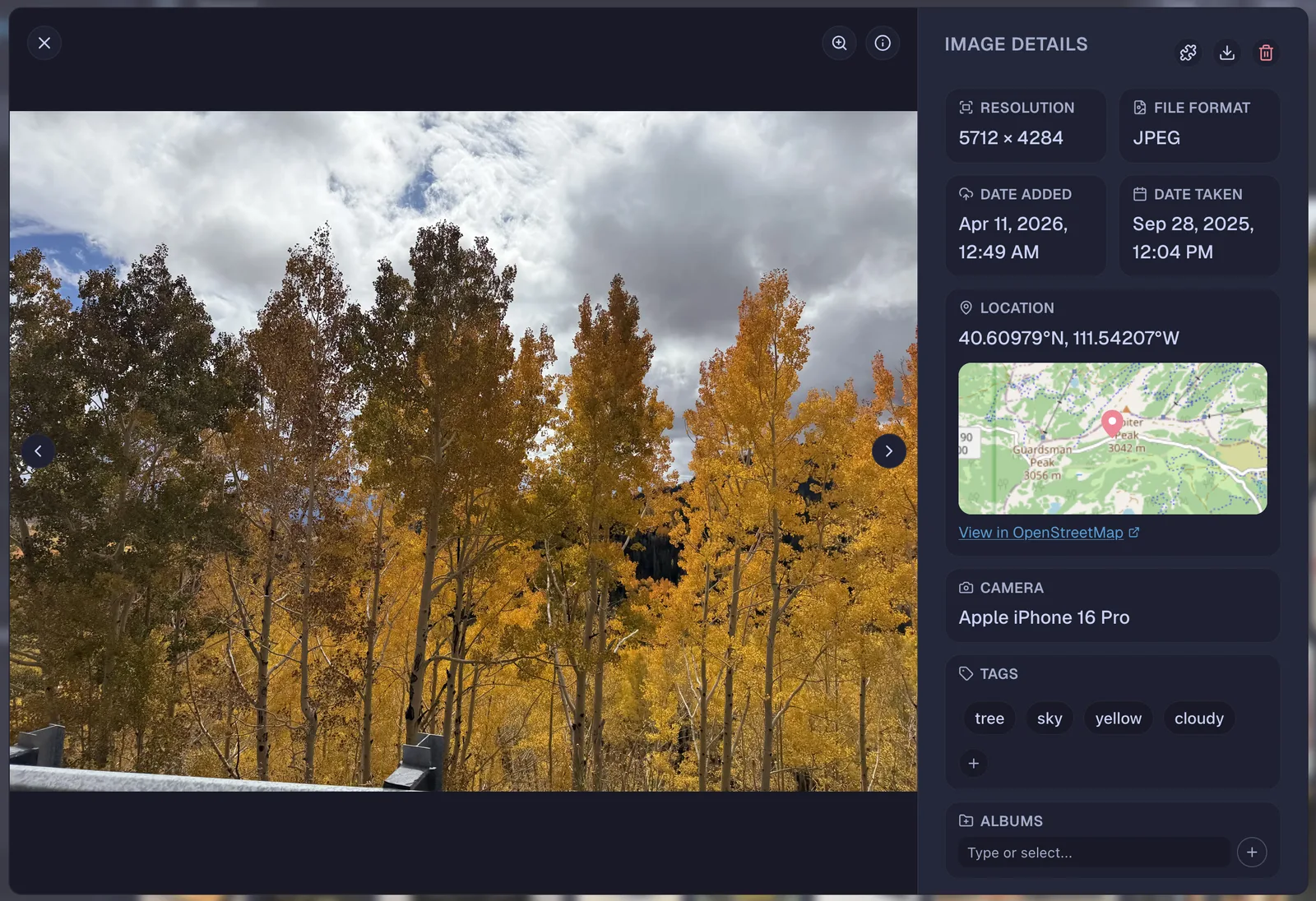
This was probably the most complex feature of the whole gallery page, and one I severely underestimated. On the surface, clicking a photo and seeing it full-screen with a metadata sidebar sounds simple. In practice, there were a lot of moving parts. The zoom had to work relative to wherever the cursor was sitting, not just the center of the image, and getting that math right took longer than expected. The navigation arrows had to respect whatever filters and sort order the gallery was currently using, so cycling through photos in the overlay would follow the same ordering as the gallery below it. The metadata sidebar pulls all EXIF data extracted at upload time (resolution, date taken, date uploaded, GPS coordinates, camera model), and users can add or remove tags per-image directly from the sidebar, or collapse it entirely if they just want to look at the photo.
Custom Theme Creation
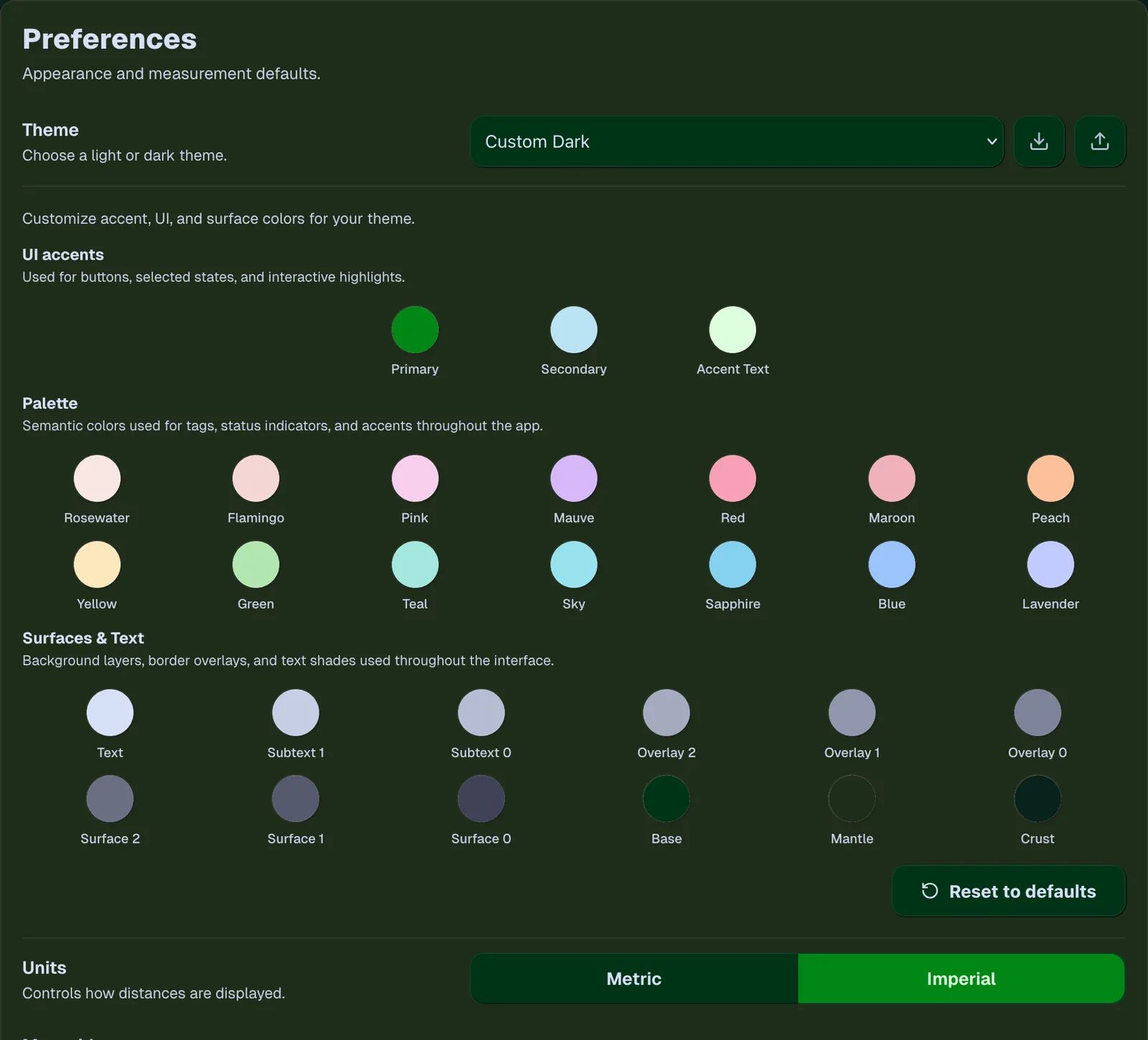
If you've been paying attention to the previous screenshots, you might have noticed they're all using different themes. FreezeTag ships with a set of built-in Catppuccin themes (Latte, Frappe, Macchiato, Mocha), but the goal was to let users also define their own color palettes without needing to touch CSS directly. The question was what format to give them. We landed on building on top of Catppuccin's existing CSS variable naming conventions: users specify which variables they want to override and what color values to assign to each one. For anyone already familiar with Catppuccin, that system is immediately familiar. For others, it's still approachable because we expose color pickers rather than raw text input. Themes can be exported and imported as JSON files, and on import the application validates the structure before applying anything. As a purely hypothetical scenario (of course), if you're a huge fan of St. Patrick's Day and really want FreezeTag to reflect that energy, who are we to stop you?
What Was Actually Hard
Most of the challenges with FreezeTag were technical ones. The thing that kept coming up was infrastructure compatibility, where versioning conflicts between libraries, packages missing support for the specific functionality we needed, and unexpected interactions between different parts of the stack all caused headaches in their own way. These problems also don't show up until you're already knee-deep into an implementation, which makes them almost impossible to plan around.
Authentication and the job tracking system were the two that cost us the most time. We had estimated authentication at about four weeks of dev time, but finished it ahead of schedule because bcrypt handled most of the hard parts for us. The jobs system was the opposite. What looked like a straightforward progress-tracking feature turned out to require building an entirely new subsystem before we could even get started on the actual feature. We did not see that coming when we wrote the estimate, and that ended up making us have to rework the timeline we set up at the beginning of the semester.
Some features also got scoped down along the way. For example, a plugin marketplace, where users could browse and install community plugins directly from inside the app, got cut so we could keep the core experience polished (this is still something that might happen in the future, but for now, a user can upload plugins through a Git repo upload menu). The map feature was originally planned as a fully interactive embedded Leaflet map as an optional plugin, but ended up as a toggleable component since integrating Leaflet cleanly into the sidebar layout (and in general, writing plugins that directly modify the UI) wasn't worth the effort.
What I'd Do Differently
The biggest technical change I'd make is dropping Next.js for a simpler Node.js server setup. Next.js caused recurring friction throughout the project, mostly around the client/server component distinction and React hydration issues that were very painful to diagnose. Some of that was probably React rather than Next.js specifically, but for a stateful application where server-side rendering doesn't provide much benefit, the added complexity wasn't worth it.
I'd also have started active development earlier in Fall 2025. A significant chunk of that semester went into planning, designing, and evaluating options. Our project vision was clear from the start, so a lot of that could have been compressed into more actual development time.
On the design side, I wish I'd pulled in UI/UX references much earlier in the process. A lot of the visual design work required backtracking because I was figuring out design principles as I went. The Sort dropdown is the clearest example, where the first version embedded sort syntax directly in the search bar, so users would type things like sortBy=DateAdded; and sortOrder=Newest;. It technically worked, but watching non-technical users interact with it made immediately clear how undiscoverable it was. The tag management page is similar, in that it wasn't in the original design at all (our original plan was to have users modify tags only on a per-image basis), and only became obviously necessary once we were using the app with real photo collections.
I came out of it with a much stronger instinct for UI decisions than I had going in. Better starting materials would definitely have gotten me there faster, though.
What Comes Next
The plugin ecosystem is where I see the most room to grow. Right now, discovering and installing plugins requires some manual effort. A marketplace built into the app would make extensibility much more accessible, and the existing plugin architecture should make that relatively straightforward to build on top of.
On the backend, we initially thought it might be worth considering Rewriting It In Rust™ (for more reasons than just the meme). However, after looking into Rust asynchronous programming and benchmarking some of the more intensive operations, we concluded that Go's performance and convenience was much better for us, and the development speed and ecosystem familiarity it offered were more valuable for this project. So that won't happen (until a very avid Rust fan inevitably rewrites it anyway).
FreezeTag is released under the MIT open-source license. You can view the source code on GitHub and the app itself will be available on Docker Hub for easy deployment.
If you want the full picture on design decisions and architecture, my honors thesis is embedded below. It's typeset in Typst and its source is on GitHub.
Can't see the embed? Open the thesis directly.